How to Install IPTV on Phone: Android and iOS Setup Guide (2026)
Introduction
Watching IPTV on a smartphone has become a convenient way to enjoy live TV, movies, and entertainment wherever you are. Whether you use an Android phone or an iPhone, setting up IPTV is usually a simple process once you have a compatible player and the correct login details. In this guide, we explain how to install IPTV on phone in 2026, including Android and iOS setup steps, recommended apps, and tips for improving your streaming experience. Before starting, make sure you are using a legitimate IPTV service and authorized content sources.
What Do You Need to Install IPTV on a Phone?
To watch IPTV on your mobile device, you need three main things:
1. A smartphone
IPTV apps are available for both:
- Android smartphones
- iPhone and iPad devices
2. An IPTV player
An IPTV player is an application that reads your playlist or login information and displays your channels.
Popular IPTV players include:
- IPTV Smarters Pro
- IBO Player
- TiviMate (mainly designed for Android TV devices)
3. IPTV login information
Depending on your provider, you may receive:
- Username and password
- Server URL
- M3U playlist link
- Xtream Codes details
If you are looking for a complete IPTV solution, you can explore our IPTV Canada options.
How to Install IPTV on Android Phone
Android users have several IPTV application options available through the Google Play Store.
Step 1: Download an IPTV Player
Open the Google Play Store and search for an IPTV application such as:
- IPTV Smarters Pro
- IBO Player
- Other compatible IPTV players
Install the application and open it.
Step 2: Choose Your Login Method
Most IPTV apps offer different connection options:
- Xtream Codes API
- M3U Playlist
- Portal URL
For an easier setup, Xtream Codes is often the preferred option because it only requires your account details.
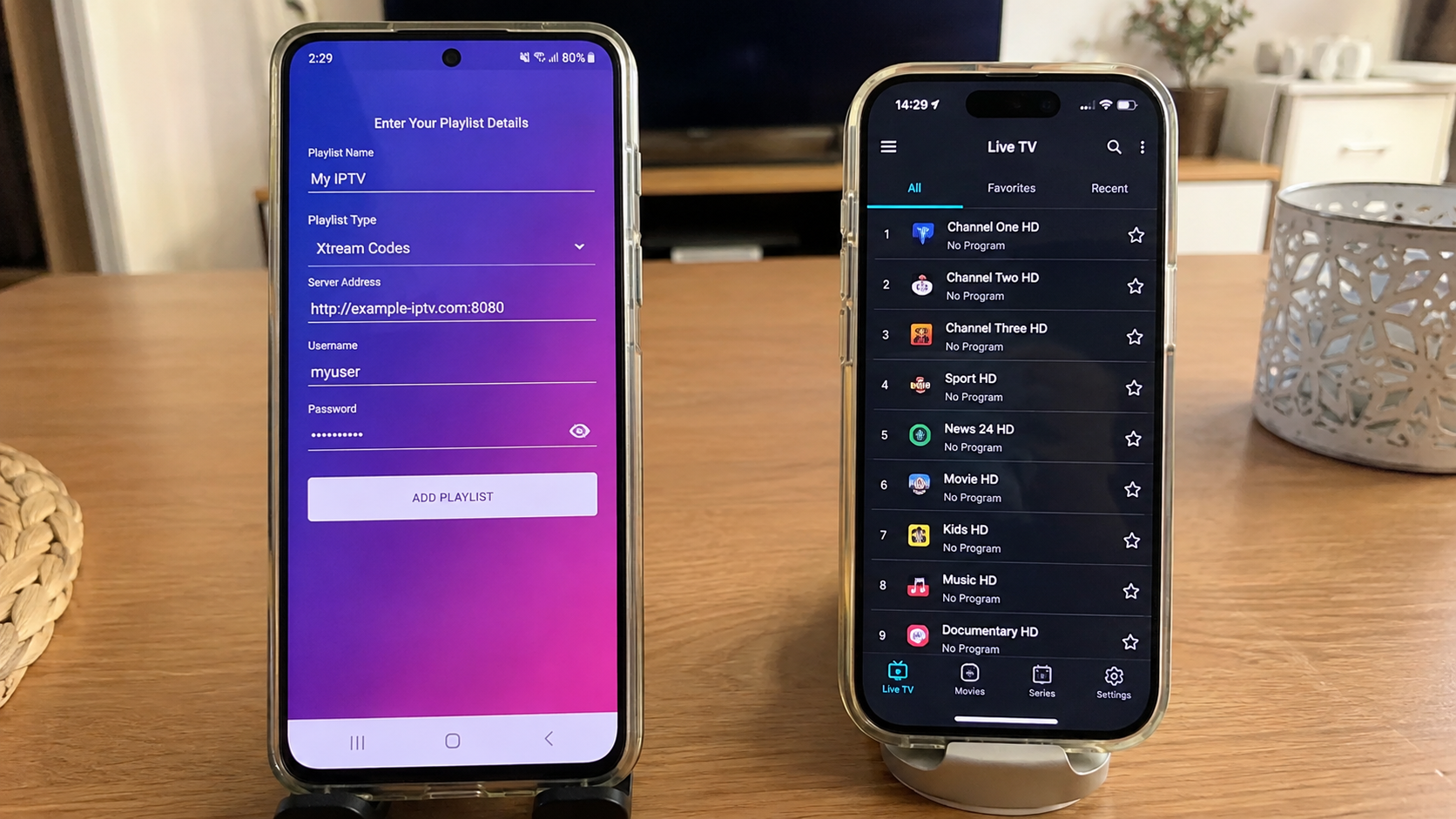
Step 3: Enter Your IPTV Details
Enter the information provided by your IPTV provider:
- Username
- Password
- Server address
After saving the information, the application will load your available content.
Step 4: Start Watching
Once your playlist is loaded, you can access:
- Live channels
- Movies
- Series
- Categories
- Favorites
How to Install IPTV on iPhone (iOS)
Installing IPTV on an iPhone is simple when using a compatible IPTV player available through the App Store. Unlike Android, iOS users have fewer IPTV player options, but several reliable apps are available.
Step 1: Download an IPTV Player from the App Store
Open the App Store and search for a compatible IPTV application, such as:
- Smarters Player Lite
- IMPlayer
- IBO Player
Download and install the application that best fits your needs.
Step 2: Add Your IPTV Account Information
After opening the IPTV player, select the option to add a new account or playlist.
Depending on the application, you may need to enter:
- Xtream Codes API details
- M3U playlist URL
- Username and password
- Server URL
Your IPTV provider will provide the required login information.
Step 3: Load Your Channels and Content
Once your account is connected, the app will automatically load your available content, including:
- Live TV channels
- Movies
- Series
- Categories
- Favorites
You can then start watching IPTV directly from your iPhone or iPad.
Tips for Better IPTV Performance on iPhone
For the best experience:
Make sure your device has enough storage space.
Use a stable Wi-Fi connection whenever possible.
Keep iOS and your IPTV application updated.
Close unused background apps to improve performance.
Tips for Better IPTV Streaming on Your Phone
A smooth IPTV experience depends on more than just the application.
Use a Stable Internet Connection
For HD streaming, a reliable Wi-Fi connection or strong mobile data connection is recommended.
Keep Your IPTV App Updated
Updates can improve:
- Performance
- Security
- Compatibility
- Stability
Use a Recent Smartphone
Older phones may struggle with high-quality streaming, especially with HD or 4K content.
Manage Storage Space
Keeping enough free storage helps your device run smoothly and prevents performance issues.
Common IPTV Installation Problems on Phones
Channels Are Not Loading
Possible causes include:
- Incorrect login information
- Server issues
- Internet connection problems
Double-check your credentials and network connection.
The App Keeps Buffering
Try:
- Restarting your router
- Closing background apps
- Lowering video quality if needed
IPTV App Cannot Be Installed
Make sure:
- Your device supports the application
- Your operating system is updated
- You are downloading apps from official sources
IPTV on Multiple Devices
Many users want to enjoy IPTV on more than one screen, including:
- Smartphones
- Tablets
- Smart TVs
- Streaming devices
Choosing the right plan can make managing multiple devices easier. You can view available options through our IPTV plans.
A flexible IPTV setup allows you to enjoy entertainment at home or while traveling.
Why Use IPTV on Your Phone?
Installing IPTV on a smartphone provides several advantages:
- Watch content anywhere with an internet connection
- No need for additional hardware
- Easy access to entertainment
- Portable viewing experience
For users who want more flexibility, a reliable IPTV Service can provide a convenient way to organize their viewing experience across different devices.
Frequently Asked Questions
Can I install IPTV on any smartphone?
Most modern Android phones and iPhones support IPTV applications, as long as the device meets the app requirements.
Do IPTV apps provide channels by themselves?
No. IPTV players are tools used to access compatible playlists or services. The application itself does not provide channels.
Is IPTV better on Android or iPhone?
Both platforms can provide a good experience. Android offers more device flexibility, while iPhone users benefit from a controlled app environment.
Can I use IPTV on multiple devices?
Yes, depending on your plan and provider settings. Check available options through our IPTV pricing page.
Conclusion
Installing IPTV on a phone in 2026 is a straightforward process for both Android and iOS users. With the right IPTV player, stable internet connection, and correct setup information, you can enjoy a smooth mobile entertainment experience.
Whether you prefer Android flexibility or the simplicity of iPhone, choosing a reliable setup is the key to getting the best performance from IPTV on your smartphone.